MultConvert homeMultConvert

Convert Images Online Instantly

Easily convert JPG, PNG, WEBP, HEIC, BMP, and other image formats for free.Bring files directly from 30+ clouds for instant processing without losing quality.

Upload

Select your file here to get started

or drop your file here.

100% Private
Lightning Fast
No Sign-up
No Install

How to Convert Images Online

Easily convert images between different formats in seconds — optimize for web, social media, or storage.

Step 01

Upload Your Image File

You can drag and drop your files here, upload them from your computer, or import them instantly from cloud storage and URLs. Whether you have a high-res HEIC or a web-ready WEBP, we bridge the format gap for you. You will always keep your original quality.

Step 02

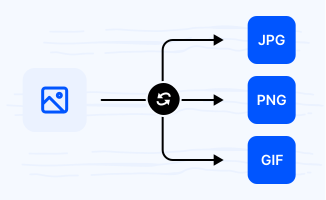
Choose Output Image Format

You can select the perfect format for your image conversion. We support JPG, PNG, WEBP, HEIC, BMP, GIF, and many other options. You can easily get the exact file type you need for any project.

Step 03

Download Your Converted Image

You can download your high-quality images with absolutely no watermark. You can get your perfect files right now and use them anywhere.

Explore Popular Online Image Converters

Easily change image formats like JPG to PNG, PNG to JPG, WEBP to JPG, HEIC to JPG, and BMP to PNG — fast, secure, and fully online.

HEICJPG

Convert HEIC to JPG for maximum device compatibility, especially when iPhone photos cannot be opened on Windows, Android, or web platforms. Ideal for sharing, uploading, and cross-device viewing.

WEBPPNG

Convert WEBP to PNG to preserve lossless quality and transparency, making it ideal for design, UI assets, and image editing workflows.

WEBPJPG

Convert WEBP to JPG for better compatibility across older browsers, editing tools, and social media platforms that do not fully support WebP.

PNGJPG

Convert PNG to JPG to reduce file size for faster web loading, or email sharing while maintaining acceptable visual quality.

HEICPNG

Convert HEIC to PNG when you need lossless quality and transparent background support for editing, design, or compositing workflows.

PNGSVG

Convert PNG to SVG to transform raster images into scalable vector graphics for logos, icons, and UI elements that require infinite zoom clarity.

JPGPNG

Convert JPG to PNG to restore lossless quality and enable transparency support for further editing and graphic design use cases.

JFIFJPG

Convert JFIF to JPG to ensure universal compatibility across browsers, operating systems, and content management systems that require standard image formats.

HEICJPEG

Convert HEIC to JPEG for seamless sharing and viewing across all devices, platforms, and legacy software that only supports standard JPEG format.

Why Choose MultConvert for Online Image Conversion?

Cloud File Conversion

Import files from your cloud drive and convert them online without downloading them to your local device first. Supports 30+ Clouds.

Safe & Secure

Your Security Comes First. MultConvert protects your files with 256-bit SSL encryption and automatically deletes them after conversion is complete.

Batch Conversion

Convert multiple files at once to save time and improve efficiency, especially when working with large numbers of documents, images, audio, or video files.

Frequently Asked Questions

Will converting images reduce quality?

No. Most image conversions preserve visual quality, especially when converting between lossless formats like PNG or WEBP.

However, converting from lossy formats (like JPG) may slightly change compression levels depending on the output format.

Why did my converted image file become larger?

Different image formats rely on distinct compression methods. For instance, converting a JPEG to a PNG will almost always result in a larger file size. This happens because JPEG is a lossy format that permanently discards subtle, imperceptible image details to keep file sizes minimal. PNG, on the other hand, is a lossless format engineered to preserve every single pixel perfectly. In fact, I ran a quick test to verify this, and the results speak for themselves: a mere 92.8 KB JPG swelled to 197 KB upon being converted to a PNG.

Will transparency be preserved after conversion?

Yes, but only if the target format supports it. Formats like PNG and WebP easily preserve transparent backgrounds. JPEG, however, does not support transparency at all; if you convert a transparent PNG or WebP to JPEG, that transparent background will automatically be flattened (usually into a solid white or black background).

Can I open converted images on all devices?

Generally, yes. Converting your images to universally accepted formats like JPEG or PNG ensures they will open seamlessly across Windows, macOS, Android, iOS, and all web browsers. However, if you convert images to newer or platform-specific formats like HEIC or WebP, some older devices, legacy software, or specific operating systems may still require additional plugins or conversion for full compatibility.

Will image metadata (EXIF data) be lost?

Not necessarily, but it is possible. While standard output formats support metadata, certain conversion tools or aggressive compression processes automatically strip out camera settings, location tags, and timestamps to reduce file size. To ensure your EXIF data is preserved, it is best to use a converter that explicitly offers a "retain metadata" setting.

Can I convert multiple images at once?

Yes, absolutely. Most modern image conversion tools (including MultConvert) support batch conversion, allowing you to upload and process dozens of JPG, PNG, WebP, or HEIC files simultaneously. This eliminates the hassle of converting files one by one, significantly saving you time when handling large photo albums or design assets.

Why can't I open HEIC images directly?

HEIC is mainly used by Apple devices. Many Windows PCs, Android devices, and older software do not support it natively, so converting HEIC to JPG or PNG is required for universal access.

Ready to Convert Images Online?

Upload any image file and see the magic happen — free, private, instant.