MultConvert homeMultConvert

Convert Audio Files Online Instantly

Convert MP3, WAV, FLAC, and OGG audio files for free.Support 30+ clouds for instant processing, and you will always get perfect, clear sound.

Upload

Select your file here to get started

or drop your file here.

100% Private
Lightning Fast
No Sign-up
No Install

How to Convert Audio Files Online

Convert audio formats in a flash, and make any music or recording ready for your phone, car, podcasts, and video projects.

Step 01

Upload Your Audio File

You can drop your tracks here, upload them from your computer, or pull them straight from your cloud drives. It does not matter if your file is a large, uncompressed WAV or a simple mobile recording. We process it instantly without losing a single bit of audio data.

Step 02

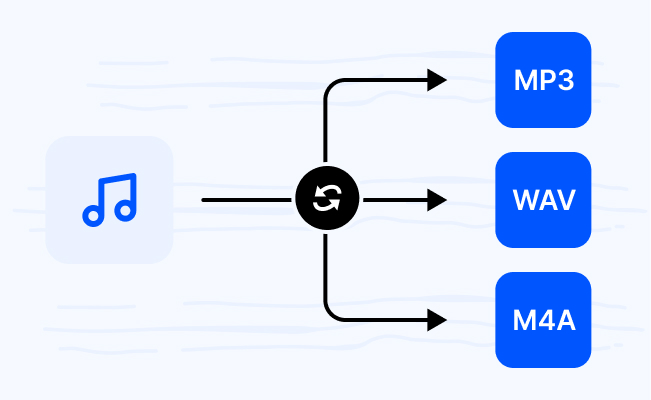
Choose Output Audio Format

You have plenty of choices here, including MP3, WAV, FLAC, M4A, and OGG. Just click on your target format, and we will tailor the track perfectly to fit your smartphone, car stereo, or audio editing software.

Step 03

Download Your Converted Audio

Your new audio files are ready for action. You enjoy 100% free access, zero restrictions, and absolutely no watermarks. You can download everything together in one click or separate them one by one.

Explore Popular Online Audio Converters

You have different files, and we have the perfect tools. Easily convert audio formats between MP3, WAV, M4A, FLAC and more.

MP4MP3

Extract crystal-clear MP3 audio from your MP4 videos to build your offline playlist. Perfect for turning video podcasts, live concerts, and lectures into background audio that plays seamlessly on any device—even with your screen turned off.

MP3WAV

Convert MP3 to uncompressed WAV format to restore full audio data and prevent generational quality loss. Perfect for precise audio editing, multi-track mixing, and high-fidelity playback without missing a single detail.

MOVMP3

Convert Apple-native MOV videos to universal MP3 audio to play your favorite soundtracks on Windows, Android, or any media player. Break free from ecosystem limits and enjoy portable background audio anywhere.

MP4WAV

Turn your MP4 videos into high-quality WAV files for smooth editing. Best for isolating clear voice recordings, interviews, and background music that you can easily use in any video editing software.

MP3OGG

Convert MP3 to OGG format to support perfect audio looping and low latency. Ideal for game developers, web designers, and app creators who need smooth sound effects and background music that repeat without gaps.

MKVMP3

Convert MKV videos to MP3 to easily save movie soundtracks, background music, or dialogue. Perfect for archiving your favorite cinematic songs or downloading show audio to practice language listening.

WEBMMP3

Convert WebM web videos into standard MP3 tracks to enjoy your favorite content offline. Perfect for turning downloaded online clips, music videos, and social media videos into portable songs.

MOVWAV

Transform Apple-native MOV files into standard WAV audio tracks for smooth editing. Get production-ready audio that imports perfectly into video editors and audio tools with zero quality loss.

Why Choose MultConvert for Online Audio Conversion?

Cloud File Conversion

Import files from your cloud drive and convert them online without downloading them to your local device first. Supports 30+ Clouds.

Safe & Secure

Your Security Comes First. MultConvert protects your files with 256-bit SSL encryption and automatically deletes them after conversion is complete.

Batch Conversion

Convert multiple files at once to save time and improve efficiency, especially when working with large numbers of documents, images, audio, or video files.

Frequently Asked Questions

Will converting my MP3 to WAV make the sound quality better?

Honestly, no. MP3 is already a "lossy" format, meaning some audio data was permanently deleted to save space. Converting it to WAV won't bring that lost data back, but it will stop your audio from losing even more quality if you plan to edit or remix it in music software.

Why do game developers prefer OGG over MP3 for background music?

Because MP3 files naturally have a tiny, annoying gap of silence at the very beginning and end. If you try to loop a background track in a game, it will stutter. OGG allows for perfect, seamless audio looping, which is why it is the go-to format for games and apps.

I downloaded a video from social media and it's a WEBM file. Can I turn it into a song?

Yes. WEBM is a highly compressed format used by major video streaming websites and social platforms. Since most default music players can't open WEBM, converting it to MP3 is the fastest way to turn those trending web clips and music videos into offline songs for your phone.

I need to edit an interview recorded on my Mac/iPhone. Should I use MP3 or WAV?

Choose WAV. Your iPhone or Mac recorded the MOV video with high-quality audio. If you convert it to MP3, you compress it and lose detail. Converting MOV to WAV extracts 100% uncompressed raw audio, ensuring your video editing or audio tools get the cleanest sound for smooth editing.

I have a whole folder of voice memos. Do I have to upload them one by one?

Not at all. You can drop all your voice memos into our tool at once. The batch conversion feature allows you to process dozens of MP3, WAV, or M4A tracks simultaneously, saving you from the tedious headache of clicking through them one by one.

Will changing the format ruin my song's sound quality?

No, it depends on your choice. Moving between lossless formats like WAV and FLAC keeps your audio 100% untouched. However, if you convert a high-quality file into a compressed format like MP3, some subtle sound details are removed to shrink the file size, which might slightly affect how it sounds on professional headphones.

Ready to Convert Audio Online?

Upload any audio file and see the magic happen — free, private, instant.